Import Instagram & TikTok workouts into a plan you can log.
GLEAMO turns a public Instagram reel or TikTok video into a logged workout: paste the link or upload the video, and GLEAMO identifies each exercise, gives it its own demo motion clip, and drops it into your training week with sets, reps, and weight to record.
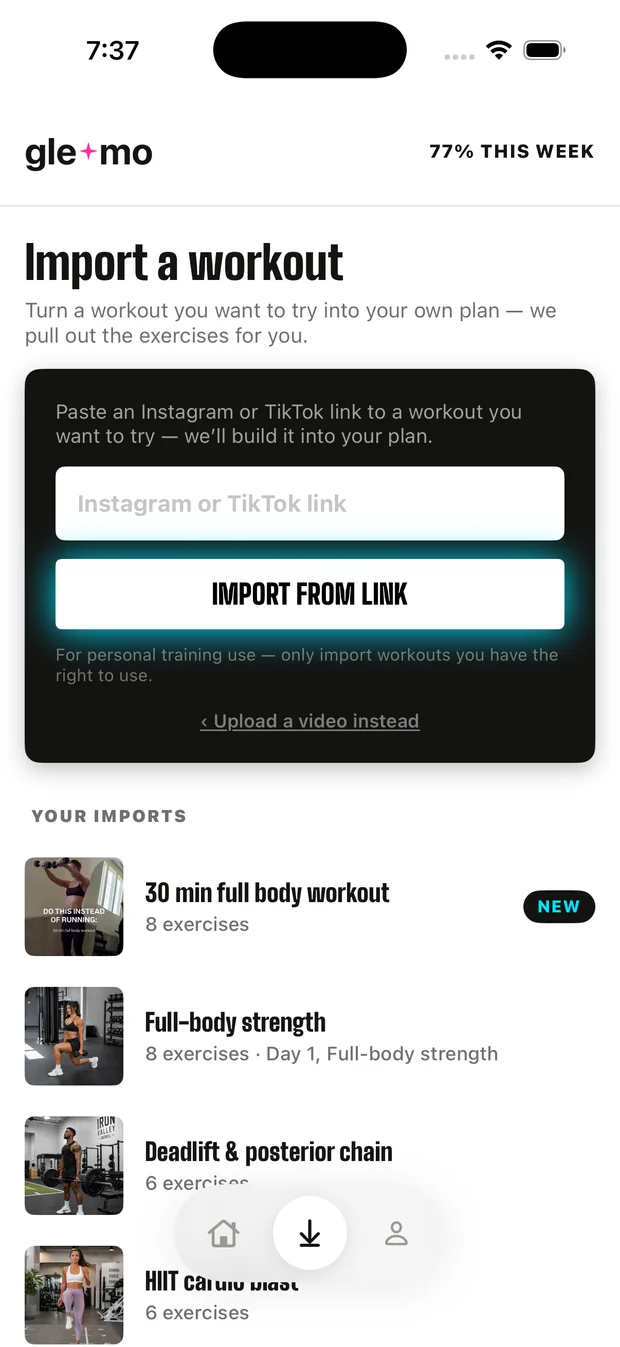
What importing a workout does
The saved video isn't the workout — the logged sets are. GLEAMO's import exists to close that gap.
Saved reels are easy to collect and hard to turn into a workout. The video shows six moves in forty seconds, with no rep scheme, no weights, and no way to track whether you did it. GLEAMO takes that video and produces a structured session: each exercise named and matched against our exercise library, each one given its own short demo motion clip so you can see the movement in isolation, and each one assigned sets and reps you can log and progress week to week.
The imported session becomes part of your training week alongside the plan GLEAMO already built for you. It isn't a separate library you have to remember to open. When you finish it, it counts toward your weekly completion, shows up in your history, and — if you train with a partner — appears in what they see too.
Import runs as a background job. You paste the link, put your phone down, and get a push notification when the workout is ready.
How it works
- Paste a link or upload a video. GLEAMO accepts public Instagram reels and posts (
instagram.com/reel,/reels,/p,/tv) and TikTok videos, includingvm.andvt.short links. Or upload any workout video from your camera roll. - GLEAMO identifies each exercise. It watches the whole video and names every move, with sets, reps, a starting weight, and a form cue, written from what the video shows, not a stock template.
- Each move gets its own clip. Instead of scrubbing a forty-second reel to find move four, GLEAMO cuts every exercise into its own short, looping clip, from the moment it starts to the moment it stops.
- It lands in your week with sets, reps, and weight. The imported workout appears in your plan, ready to log. Swap any exercise, adjust the dose, and progress it like everything else.
- You get a push when it's ready. Import is a background job — usually a few minutes — and GLEAMO notifies you the moment the workout is built.
Who this is for — and who it isn't
GLEAMO's import is for people who follow fitness creators and want to train from what they save, without losing the structure of a real program.
Built for you if
- You save workout reels or TikToks and want to train from them
- You want those workouts logged with sets, reps, and weight — not just watched
- You already follow a plan and want creator workouts folded into it
- You want a clear demo of each movement, not a 40-second scrub
- You're on iPhone
Probably not for you if
- You want a video library organizer with folders, tags, and playback timers — FitSaver and Gymdex are built for that
- You're on Android (GLEAMO is iOS only right now)
- You need private or login-walled videos imported — GLEAMO imports public links and your own uploads
- You want to import an entire multi-week program from one link — GLEAMO imports one workout per video
GLEAMO vs. FitSaver vs. Gymdex
Organizers save the video; GLEAMO turns it into a workout you can log and progress. That's the whole difference — and it cuts both ways.
FitSaver and Gymdex are workout organizers: you save a video, tag it, and play it back, often with a timer. They are good at that, and they run on both iOS and Android. From their public materials, neither decodes the video into individual exercises or logs sets, reps, and weight against a plan. GLEAMO does — but only on iOS, only from public links or your own uploads, and only into a GLEAMO plan.
| GLEAMO | FitSaver Workout organizer |
Gymdex Influencer Workouts |
|
|---|---|---|---|
| Save Instagram / TikTok workout videos | Yes | Yes | Yes |
| Identifies each exercise in the video | Yes | No | No |
| Auto-generated demo clip per exercise | Yes | No | No |
| Logs sets, reps & weight against a plan | Yes | No | No |
| Folded into your personalized program | Yes | No | No |
| Folders / tags / playback timer | No | Yes | Yes |
| Android | No | Yes | Yes |
| Price | $6/mo · $35/yr, 7-day trial | See fitsaver.app | See App Store |
Competitor details are taken from each app's public website and App Store listing as of September 2026 and may change. If we've got something wrong, tell us and we'll fix it.
Questions about importing workouts
Is there an app that turns an Instagram or TikTok workout into a plan?
Yes — GLEAMO does. Paste a public Instagram reel or TikTok link, or upload a video, and GLEAMO identifies every exercise, gives each one a demo clip, and adds the workout to your training week with sets, reps, and weight to log.
Is there a fitness app that works with Instagram Reels?
Yes. Most apps that come up for "fitness app Instagram Reel" are editors for making reels. GLEAMO works the other way around. It takes a workout reel you saved and turns it into a session you can train from, with sets, reps, and weights to log, inside the plan it already built for you.
How do I turn a workout I saved from Instagram into one I can follow?
Copy the reel's link, open GLEAMO, and paste it into Import. GLEAMO builds the workout in the background and notifies you when it's ready. Then you train from it like any other session in your plan — logging each set — instead of watching the video again.
What links does GLEAMO accept?
Public Instagram reels and posts (instagram.com/reel, /reels, /p, /tv) and public TikTok videos, including vm.tiktok.com and vt.tiktok.com short links. Private accounts and login-walled content can't be imported by link — but you can upload any video from your camera roll.
Does GLEAMO figure out the exercises, or do I type them in?
GLEAMO identifies the exercises from the video and matches them to its exercise library. You can rename, swap, reorder, or remove any exercise afterward, and add ones it missed.
How is this different from FitSaver or Gymdex?
FitSaver and Gymdex save and organize workout videos and let you play them back, often with a timer, on iOS and Android. GLEAMO goes a step further: it turns the video into a structured, loggable workout — each exercise identified with its own demo clip — inside the personalized plan it already built for you. GLEAMO is iOS only.
How long does an import take?
Usually a few minutes. Import runs as a background job so you can close the app; GLEAMO sends a push notification when the workout is ready.
Does importing cost extra?
No. Import is included in GLEAMO Pro: 7-day free trial, then $6/month or $35/year. Cancel anytime.
Import your first workout today.
$6/mo or $35/yr after a 7-day trial.